
A hull is a control net. Pull one point and the surface follows.
SeaCraft models a hull the way FREE!ship does: a coarse net of points refined into a smooth subdivision surface, with creases where a chine or a stem needs a hard edge. There are no NURBS patches to keep in step.
You work in four linked views: perspective, profile, plan and body plan. Hydrostatics update when you let go of a point, and undo goes back 64 steps. Autosave can bring your work back after a crash.
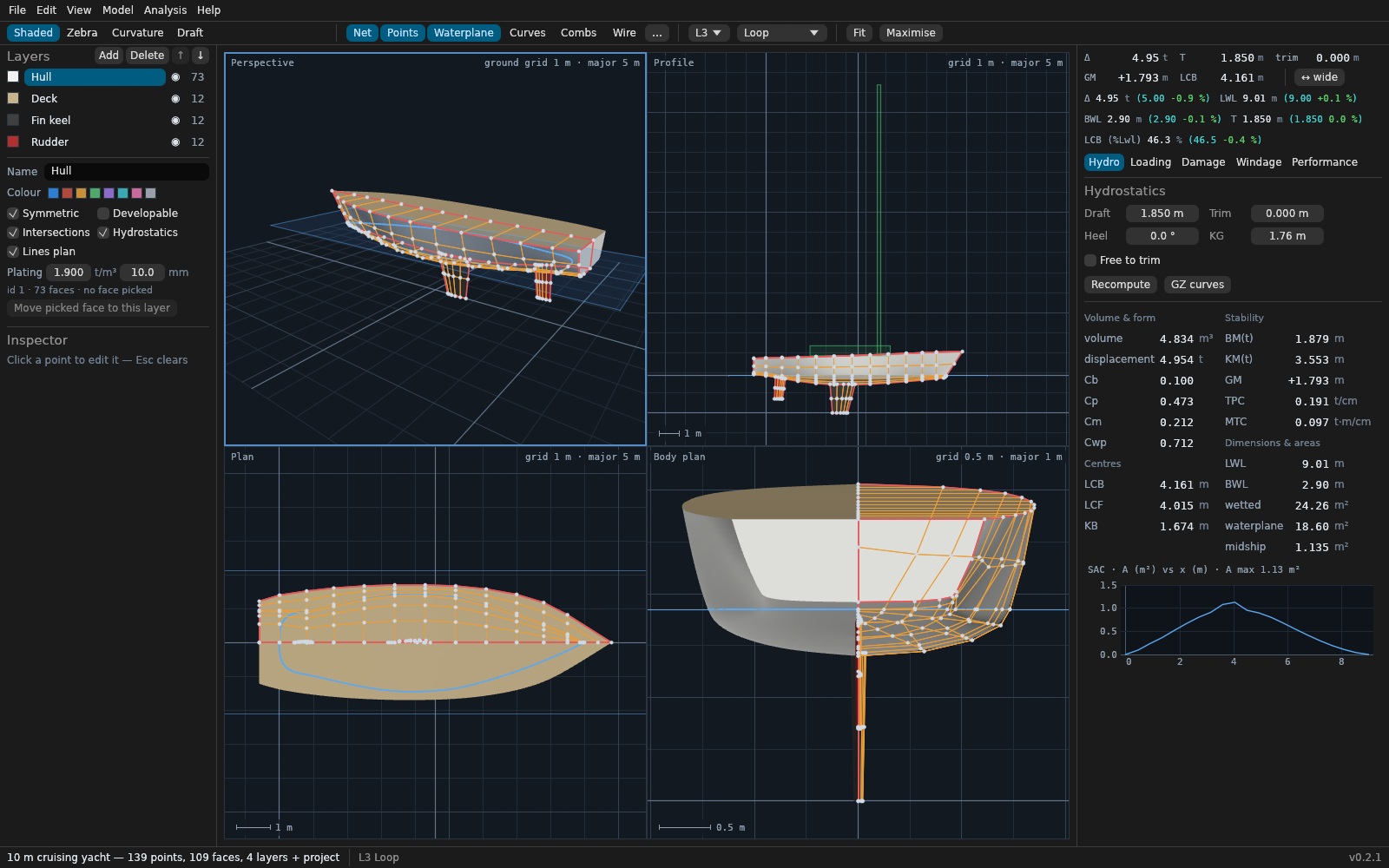
From lines to numbers, for the selected hull
The steps below follow one hull through the program. Every number comes from SeaCraft, and the commands get you the same numbers. Choosing another hull at the top of the page changes all of them.
-
Cut the lines
Stations, buttocks and waterlines are cut from the refined surface and exported as SVG, DXF or IGES. Curvature combs show you where a line is unfair.
Buttocks Waterlines Stations Cut for this page from the mesh SeaCraft exports. -
Measure the hydrostatics
Volume, displacement, centres, coefficients and metacentres are integrated over the panels of the refined mesh, at any draft, trim and heel. The curve shows how the underwater volume is spread along the length.
-
Check the stability
Cross curves and righting levers past 90° of heel, with free trim. Add loading conditions with tanks and free-surface correction, lost-buoyancy damage cases, and the IMO intact and weather criteria as arithmetic on these numbers.
-
Estimate the resistance
Holtrop and Mennen for displacement ships, Michell thin-ship theory, the Delft series for yachts and Savitsky for planing hulls. An optimiser can then adjust Cp, LCB and L/B for a target speed.
-
Predict the motions
Strip-theory heave and pitch in regular head waves, then irregular seas, significant motions and motion sickness incidence.
-
Hand it on
A self-contained HTML report collects the measurements. Meshes and curves go out as OBJ, STL, 3MF, PLY, IGES and DXF for CAD and 3D printing, and developable plates unfold to SVG.
Open what SeaCraft wrote for this hull:
Let an AI agent work on the hull
seacraft mcp is a Model Context Protocol server. An agent can load a hull, move control points, measure, render a picture and save, using the same code the desktop app runs.
Point it at a running modeller and you watch the edits happen. That connection stays on your own machine and needs a token by default, and you can limit which folders it reads and writes.
The repository includes skills that teach an agent to reach design targets, fair a hull and report stability. They tell it to re-measure after each change, and to look at a render instead of guessing from coordinates.
Work on a file, with edits held until the agent saves:
claude mcp add seacraft -- seacraft mcp --open hull.fefOr drive a modeller you can see:
seacraft-gui --control 127.0.0.1:7878 --open hull.fef
claude mcp add seacraft -- seacraft mcp --connect 127.0.0.1:7878
Download
Ready-made programs for Windows, macOS and Linux are on the latest release. Each one holds the desktop app, the seacraft command and the example hulls. To begin, choose Open an example on the start screen.
The current version is 0.3.0. Anything may change while it is 0.x.
Windows and macOS are untested. Those builds are compiled and tested automatically, but nobody has opened the app on them by hand yet. Feedback is welcome: open an issue and say what worked and what did not.
- Windows, 64-bit
seacraft-*-x86_64-pc-windows-msvc.zip. Unzip it, then double-clickseacraft-gui.exe. The program is not signed, so SmartScreen may warn you. - Mac with an Apple chip
SeaCraft-*-arm64.dmg. Open it and drag SeaCraft to Applications. The app is not notarised, so the first time, allow it in System Settings > Privacy & Security. - Mac with an Intel chip
SeaCraft-*-x86_64.dmg, with the same steps. - Linux
SeaCraft-*-x86_64.AppImage, a Flatpak bundle, or a plain.tar.gzfolder.
Or build it from source
You need rustup, which installs the pinned Rust version for you.
Open the app with an example hull:
git clone https://github.com/havan/SeaCraft
cd SeaCraft
cargo run --release -p seacraft-gui -- --open examples/trawler-22m.fef
Or measure from the command line:
cargo run --release --bin seacraft -- hydro examples/trawler-22m.fef --kg 2.5On Ubuntu, the desktop app also needs these libraries:
sudo apt-get install libxkbcommon-dev libwayland-dev libegl1-mesa-dev \
  libgl1-mesa-dev libx11-dev libxcursor-dev libxrandr-dev libxi-dev
How far the numbers have been checked
Compared with
- Closed-form cases, such as box barges.
- Separate scripts written for this project. Many of their reference numbers are not published values.
- SeaCraft’s own earlier output. The demo hull’s numbers only catch unintended changes, and say nothing about whether they are right.
Not systematically compared with
- Tank tests.
- Sea trials or other full-scale measurements.
- Approved naval-architecture software.
You can help
Comparing a result with published data is the most useful contribution anyone can make. Start with the source of each reference number, then pick a task from the roadmap.